About Me

My photo
Proud single mom of one beautiful daughter who shares my love of sports and music. She doesn't share my love of the outdoors which I find weird. I love photography and wish I had a better camera!! Maybe someday...
Showing posts with label editing. Show all posts

05 July, 2015

Let's Get Random - Everyday Photos & Different Editing Tricks

So much of life, it seems to me, is determined by pure randomness.
~~Sidney Poitier

Every now and then I like to take my camera and just take photos at home.  I try to challenge myself into getting some good shots out of commonplace, everyday life.  

It's also interesting to look back a few years later to see what life was like.


Apparently my home life in 2014 was dominated by my two rescue kitties.  Or maybe it's just that they are such beautiful, fun, loving creatures, that I can't help but take photos of them when they're attending to their kitty lives.    

This my Chavy.  He's weird, but I love him. 


Handsome closeup. He loves to pet his own face.  No human can do it according to his standards. 

I like this shot.  Sometimes its okay to not have the complete subject in focus.  Here, I focused on the feather that Chavy was playing with to illustrate that the photo is still interesting and the "focus" is still on Chavy. 

This is another shot that I used an effect to enhance it.  The photo from the outline of the sliding glass door to the right of Chavy all the way to the left is not edited at all.  But there were a couple of things on my patio that ruined the shot, including a dirty gas can. 

In Photoshop Elements 11, I selected the area inside the window pane and used an adjustment filter with gradient to black out everything on the patio while still maintaining the photographic look and drawing the attention away from the bright red and back to my cute subject. 
Another closeup, but this time I cropped in closer to put the emphasis on his paw as he pets himself.

This is a kitty friend that lived right beside our parking spaces.  He LOVED Adie's car and would lay on it at all times.  When she wasn't home, he would sit on the stairs or the sidewalk, but never another car.  

I wanted to keep everything shades of grey, but the window was reflecting and the underside of the stairs was brown.  Again, I selected the areas that had reflections or other color tones and applied a gradient filter to them. 

Oddly enough, the cat looks kind of weird, as if I accidentally selected part of him and included him in the gradient map.  I assure you I did not.  It was just the part of him that was shadowed by the overhang.  I actually tried to fix it, but it was very stubborn. lol

These are the gorgeous blossoms on the tree that overhangs the balcony.  


Speaking of the balcony, we had hummingbird and finch feeders which actually enticed a lot of our feathered friends.  This is not a good picture but I was always to slow to get a picture or had to go get my camera and missed it.  lol  

However, using a "Sin City" affect in Photoshop Elements 11, I was able to get enough definition in the photo, even shooting through a dirty window and a screen.  

Sin City is an effect that I love to use.  It's basically keeping only one or two colors in a photo.  

And now, MOAR Cats!  These photos were taken on a very sunny day and my boys were loving laying on the cat tree in the sun.  The bright, yet indirect light made for some very good shots.


"I have been meditating on the very great pleasure which a pair of fine eyes in the face of a pretty [cat] can bestow." ~~  Mr. Darcy "Pride and Prejudice"


These two love this cheap lei that I bought at the Dollar Store.
 They only play with the red, white, and blue ones though.  
My patriotic kitties. 


Ellie vetoes my kiss.  haha


In this photo, you can see that pesky red gas can in the background...if you look for it.  I used the Sin City effect again to give color only to Chavy and the cat tree.  

Baby is getting tired of me taking pictures of him.  
Occasionally, as on this day, the camera becomes his play/prey.

I'm going to finish with two different iterations of the same photo to illustrate how the different filters/effects can alter a photo.

We'll start with Chavy's scary claws in Lomo effect from Photoshop Elements II intermediate.

Now the same photo with a gradient filter. 


It's hard, once again, for me to say which one I like better.  
I would probably choose the Lomo because it brings the ball and the claws into focus.  And it's a bit easier to use.

But the bottom line is that editing effects are endless, not just with Photoshop, but there are other good software choices as well, such as Pixlr.  

The fun of photography doesn't have to end once you put down the camera!

xoxo

31 May, 2015

A Funny Thing Happened In Photoshop - Editing Photos - San Gabriel Mission & Ventura 10/28/13

I've been learning more about editing photos in Photoshop Elements 11 (the version I have) lately.  I didn't really know if I was making my photos better, per se, but I did learn how to do some fun effects, use different filters, and generally work more in expert mode.  

Well, now I kind of have a way to see if what I'm doing really makes for a better photo.  

I had some photos from October 2013 which have probably the best sunset photos I've ever taken and, to be honest, some of the best I've ever seen.  I was amazed at what God created and at what was coming across on my camera viewer. 

Then I lost them. 

The photo where they should have been?  Was empty.  I had long since deleted the photos from my camera.  I had no idea what I had done with them.  I vaguely remembered editing (or not editing, in the case of the sunset photos) them, but who knows where I saved them.

As previously mentioned, I've been trying to clean up and organize my photos.  Lo and behold, I found them in some obscurely named folder that had absolutely nothing to do anything.  haha  But they weren't edited - they were just raw *scratches head*.

So a couple days ago, I edited and relocated them so I could do another "Flashback" post.  Today, going through more folders, I found the ones I had edited previously!  Who knows what the hell I was doing.  lol

So I'm going to post them here...in groups for comparison.  Some of them were not edited originally or included in the folder where I found them. The Grill Em All photos are all from the recent edit.    

First Stop:  Grill Em All burger restaurant - Alhambra, CA


I may or may not have previously mentioned that I love food trucks.  If you do too, this name might be familiar to you...especially if you watched the first season of The Food Network's Great Food Truck Race.  Grill Em All was the winning truck and used their $50k winnings to open this restaurant.  

To be honest, I don't remember the names of what we ate; I think the first photo is The Behemoth. The second picture doesn't resemble anything on the menu really.   

But I do remember that it was pretty damn good.  Especially the truffle fries.  I would give it 4 out of 5 stars (I really should do a belated Yelp review, but they are doing well in that area). 


And this was dessert.  I don't think they have this one anymore.  It doesn't fit the one dessert on their website.

It's located in a nice little area.  I guess you might call it a strip mall, but it's a bit higher end with a lovely courtyard. 

The next day, I was set to drive back to Sacramento.  But first, I decided to stop at the San Gabriel Mission.  Let the double edits begin.


Obviously that's a much higher contrast on the 2nd photo.  Not sure it's better...I like them both. :/


Definitely love the 2nd edit on this one.  I learned how to adjust the lighting to bring out the rings in the sun rays.  I think that looks cool. 


I see pros and cons for each photo.


Same with that one.  I definitely am much better at the contrast and lighting in the second edit.  But I did a much better job with the blurring/depth of field effects. I think I like the first one a bit better.

This pic of the cactus garden and mission walls was not part of my first set of edits.  The original was really dark and I didn't trust/know as much about lightening shadows.  I like this photo.


First edit, I used the tilt shift feature.  2nd, I used the lomo effect.  I think I like the one with tilt shift better.  But I wish it was more easily controlled.  It's very restrictive. 

Here are a couple more that I apparently couldn't get to work in my first edit attempt. 


Now Leaving the San Gabriel Mission.  Next stop:  Unknown beach near Ventura

Love this gorgeous bridge.  


I like the cropping of the first because you can see the sand, but the color in the 2nd is better.  

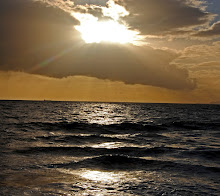
And now, for our last stop, we move further up the coast to another unknown beach where I saw that amazing sunset. 

This is the unedited original.  Probably resized, but that's it. 

For the second edit, I changed the lighting (but not the color...the darkening of the colors was achieved solely through lighting) because I wanted to have more definition around the sun, and especially bring the sunbeams out. 

I didn't have this photo in my original edits.  Probably because it's very similar to the first.  


Okay, is it just me?  The shape of the clouds around the sun TOTALLY look like the bat signal, a bat, or even a phoenix!  
Just me?  Okay then...  


I'll probably edit this with more observations after I view the post on my large screens at work. 

EDIT:  After viewing the photos on a larger screen, I can see the value of editing the light for a more dramatic photo.  I think both edits were pretty good, but I do seem to prefer photos with more definition and color.  

Personal preference I suppose.  :-)

xoxo